Visdum + Salesforce Integration | Automate Sales Commissions from CRM to Payout
.avif)
Tired of exporting Salesforce deals and rebuilding commissions in a spreadsheet every month?
If you run Salesforce as your CRM, there is a cleaner path.
Visdum runs natively inside Salesforce. It connects to your CRM to pull deals, owners, splits, and custom fields, then calculates sales commissions accurately and on time, right where your team already works. No CSV exports, no broken formula fields, no payout delays.
Before the fix, it helps to be clear on where Salesforce stops. Salesforce commission tracking is a trust-and-audit problem before it is a reporting problem: reps want to see what they earned the day a deal closes, and finance wants numbers that survive an audit. A spreadsheet bolted onto the CRM gives neither. Here is exactly where the native approach runs out, and how Visdum's Salesforce commission software closes the gap.
Does Salesforce calculate commissions natively?
No. Salesforce tracks opportunities, products, owners, and revenue, but it does not calculate commission payouts out of the box. You can create a formula field that multiplies deal amount by a rate, and that is where native Salesforce commission calculation ends.
Why does native Salesforce commission tracking fail at scale?
A formula field and a custom object look like a solution for about one quarter. Then the cracks appear.
They are not auditable. There is no statement a rep or an auditor can trace, so every dispute becomes a manual investigation.
They drift out of sync with history. Salesforce formula fields do not recalculate existing records when you change the formula, so the moment you fix a rate or adjust a rule, last quarter's numbers no longer match what you actually paid.
They do not scale for real comp logic. Tiers, accelerators, deal splits, clawbacks, and overrides each require more custom objects and developer hours, until the setup becomes a brittle web of flows only one admin understands.
The usual fallback is worse.
A practitioner describing their monthly commission routine on a CRM community forum was juggling all Excel spreadsheets in varying layouts across seven sources just to pay the team (Zoho community thread).
That pain is common: more than half of organizations that run commissions on spreadsheets pay someone the wrong amount (Fullcast, 2026 buyer's guide).
🔔 Must read: Automated CRM Commission Tracking: Benefits and Myths
Can Salesforce handle commission splits, tiers, and accelerators?
Not on its own, and this is the crack that breaks native setups fastest. Splits need credit logic across roles, for example, an AE and an SDR sharing one closed deal. Tiers and accelerators need the rate to change based on attainment. Clawbacks need reversal logic when a deal downgrades or churns. Salesforce ships none of this as a managed feature, so teams hardcode it into flows that break on the next plan change, or rebuild it in spreadsheets no one can audit.
Visdum handles all three as configuration, not code. Define credit splits by role, team, or product, build tiers and accelerators in the rule builder, and apply clawbacks and thresholds. This is the Salesforce incentive compensation setup growth teams need, without a developer in the loop.
How does the Visdum + Salesforce integration work?
Visdum starts where your Salesforce work ends. It treats your CRM as the source of truth and opens natively inside Salesforce, automatically pulling closed-won deals, owners, splits, and custom fields the moment they change. From there it applies your comp plans and calculates commissions, so reps and finance see accurate numbers without leaving Salesforce.
Setup is just a few steps; no coding required.
Step 1: Connect Salesforce to Visdum
Start by connecting your Salesforce account to Visdum. Go to the CRM integrations section in Visdum, select Salesforce, and click Connect.
.webp)
.webp)
Step 2: Create New Data Stream
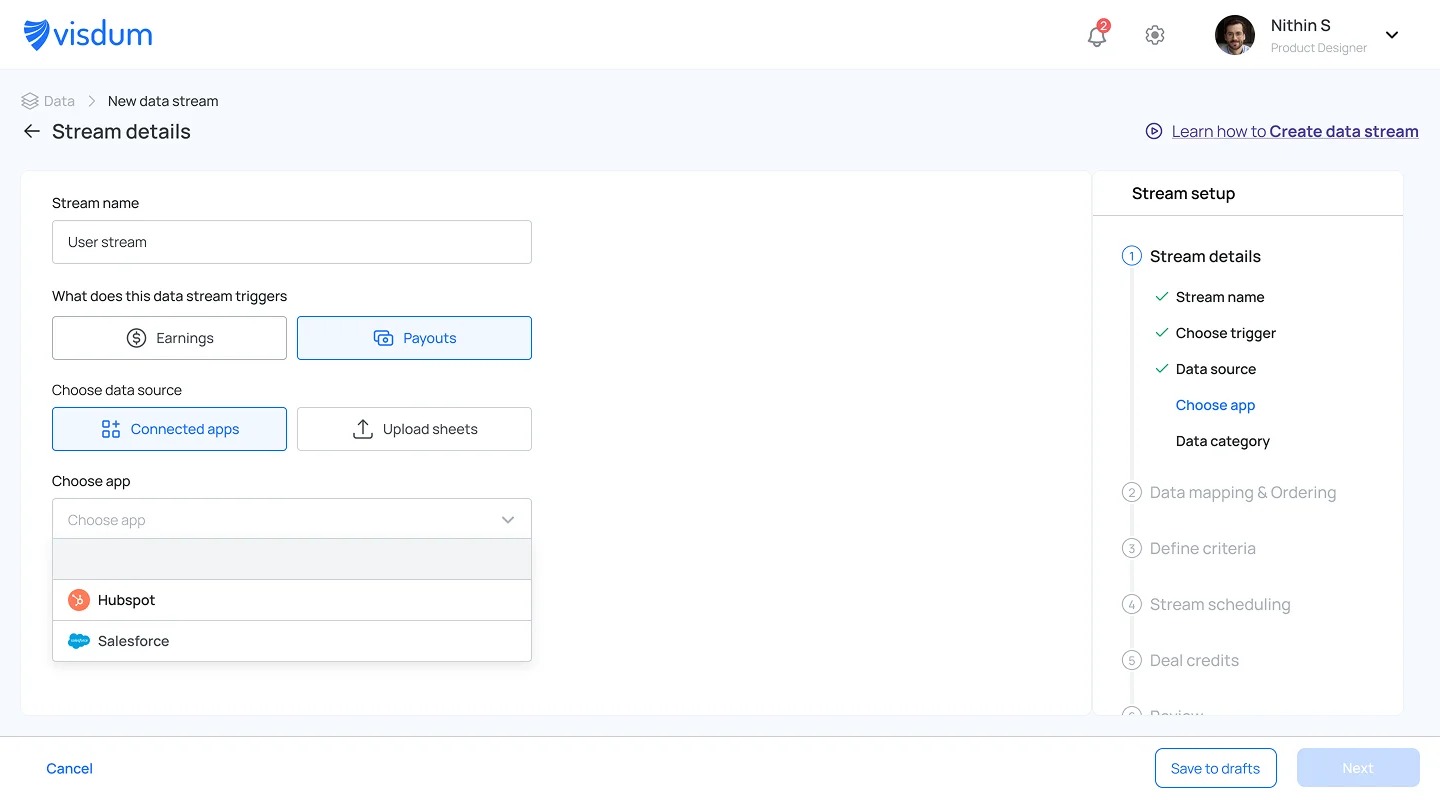
Enter a stream name, select Earning as the stream type, and choose Salesforce under Connected Apps as your data source.
Set preferences like deal credits and data sync, then click Next to proceed.
Step 3: Map Your Data Fields
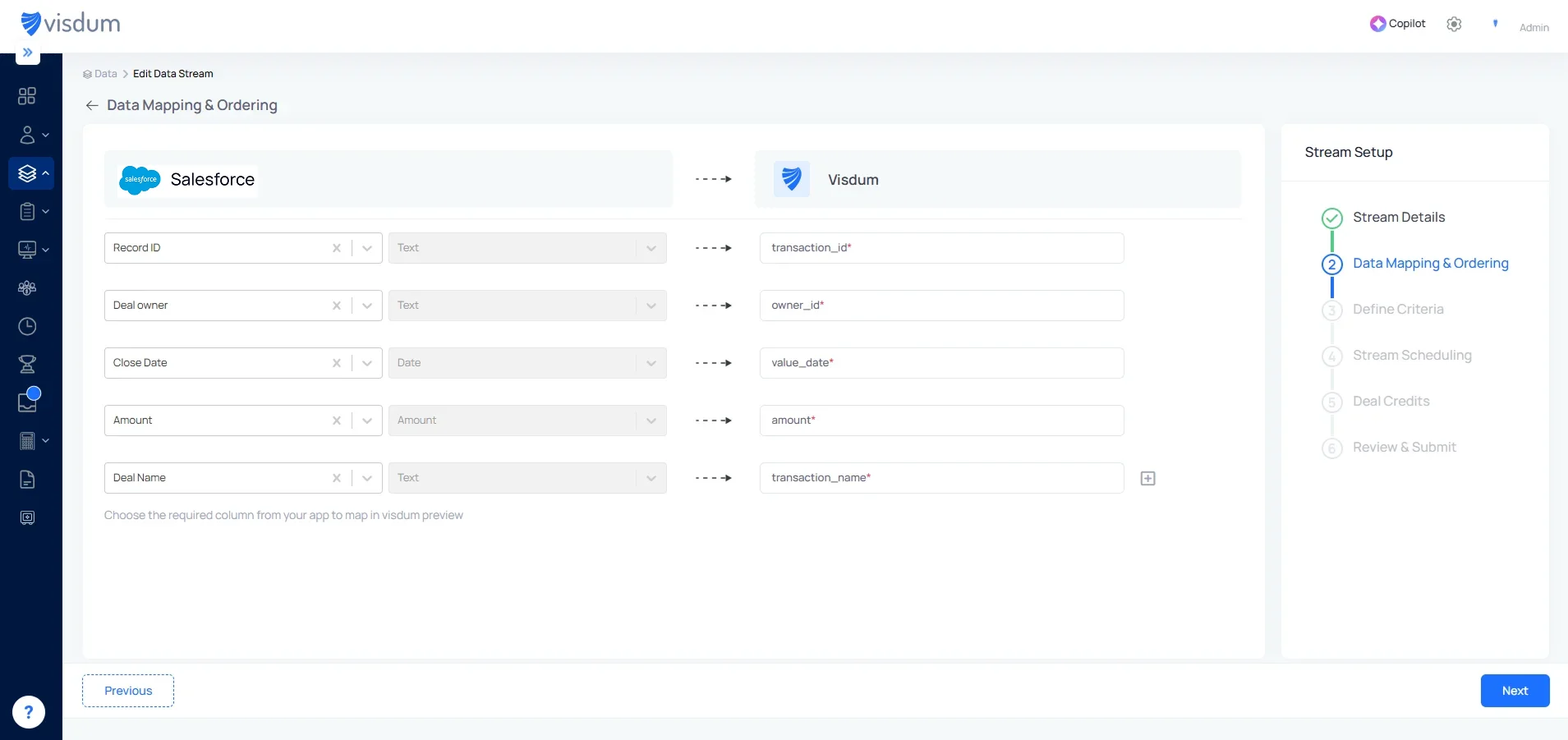
Map fields from Salesforce to Visdum fields like transaction ID, owner, date, and amount. Ensure each field is correctly aligned, then click Next to continue.
Step 4: Define Criteria
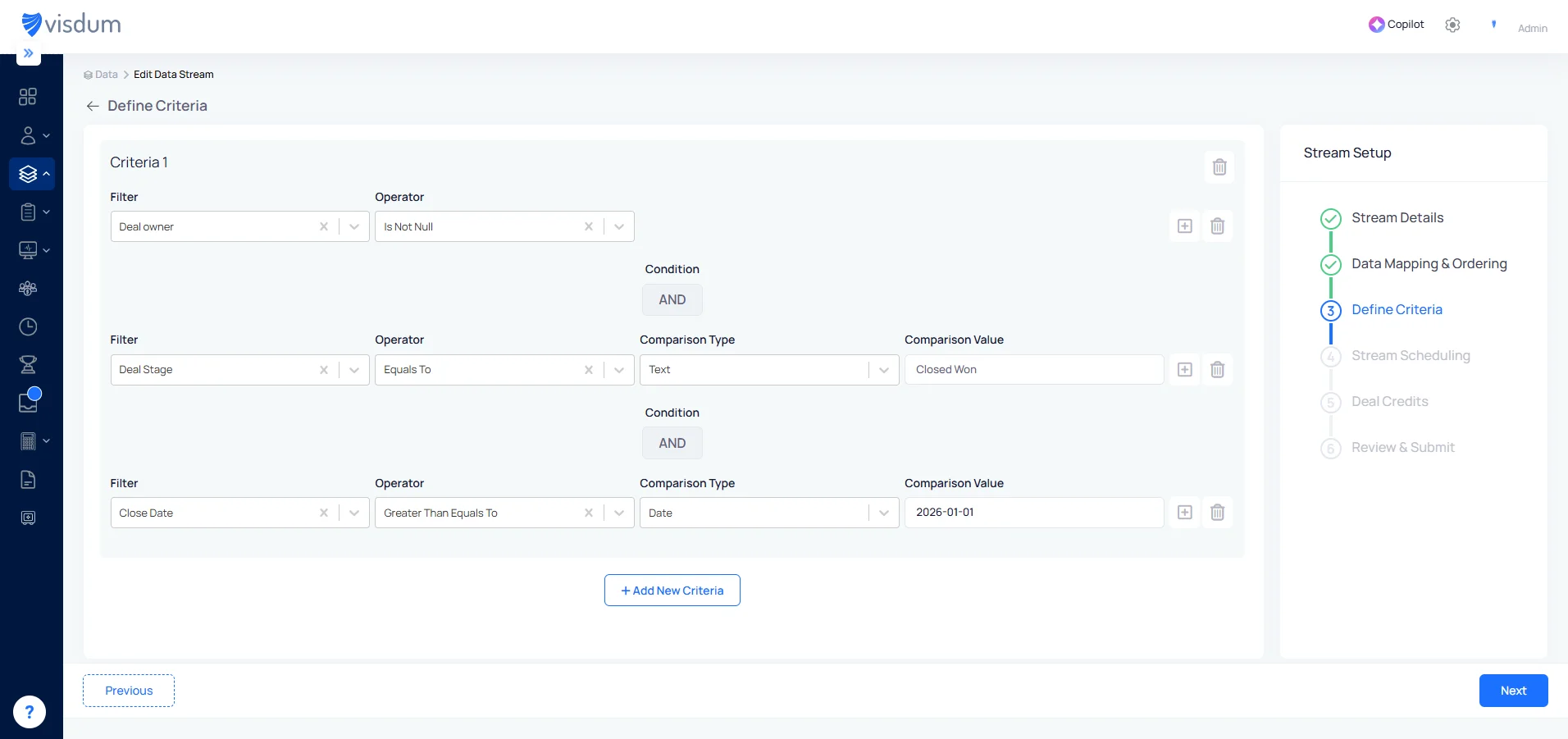
Set conditions like Deal Stage = Closed Won and apply filters such as close date or eligibility rules. This ensures only relevant deals from Salesforce are used for commission calculations.
Step 5: Schedule Data Sync
Select how frequently you want your data to sync by choosing days and time for the schedule. This ensures data from Salesforce is regularly updated for accurate commission calculations.
.webp)
Step 6: Assign Deal Credits
Define how revenue credit is assigned across contributors. Set rules for who gets credited - account owner, manager, or split across multiple roles, and at what percentage. Visdum applies these rules automatically to every transaction that meets your criteria.
.webp)
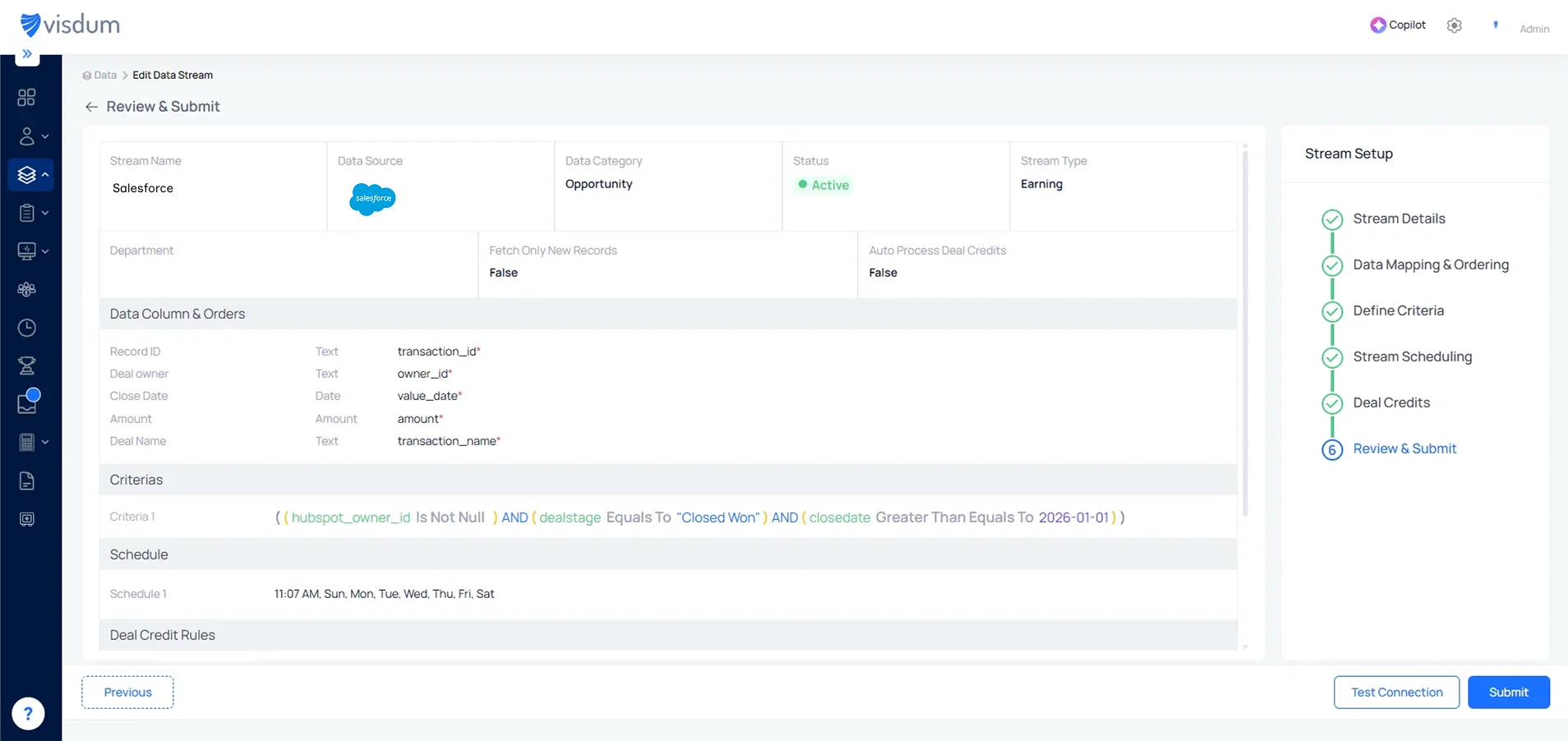
Step 6: Review & Submit
Review your data mapping, criteria, and schedule to ensure everything is correctly configured. Once verified, click Submit to activate the data stream and start syncing data from Hubspot.
Most teams go live in under an hour. Because the integration is native and no-code, you do not need a developer or a Salesforce admin to maintain it.
Salesforce alone vs Salesforce + Visdum: what changes for revenue teams?
Here is the practical difference, side by side, for the finance, RevOps, and sales teams who live with the numbers.
Why do Salesforce users choose Visdum?
When your CRM and your commission engine speak the same language, the whole process tightens up. Here is what teams experience after connecting Salesforce with Visdum, starting with what matters most.
Accuracy reps stop questioning
Every payout traces back to a specific deal and a published rule, so there is nothing hidden to argue about.
- Reps see which deals are eligible, what was credited, and what is still pending
- Splits resolve automatically across roles, so no one double-counts a deal
- Disputes fall, and reps stop keeping private tracking sheets
Example: An AE and an SDR split a closed-won deal. The moment it closes in Salesforce, each sees their exact share, instead of a number they chase finance for three weeks later.
Faster close, calmer month-end
Commissions reconcile against live deal status and credit rules, not a spreadsheet someone rebuilds by hand every period.
- Every adjustment is logged for the audit trail
- A mid-quarter rate change updates every affected statement automatically
Example: A deal slips from closed-won back to pipeline. Visdum reverses the commission on the next sync, instead of finance catching it manually weeks later.
Forecasting you can plan around
Real-time Salesforce data turns commissions into a number finance can predict.
- Accrue commission expense as deals close, not at quarter-end
- Forecast cash outflows against actual rep attainment
- Test a plan change in a sandbox before it goes live
Example: Before raising an accelerator, model it against last quarter's deals to see what it would have paid out, then decide.
One connected view of revenue and pay
Salesforce deals and billing data sit in one place, so you can see what performance actually costs, by rep, product, region, or segment.
- Tie commission spend to the revenue it generated
- Spot which plans drive the right behavior and which just add cost
Example: Compare commission cost per dollar of new ARR across two regions, and find the plan that is overpaying for the same result.
.webp)
How did a $48M cybersecurity SaaS company cut 47 hours of monthly commission work?
A $48M ARR cybersecurity platform ran commissions for 58 quota-carrying reps across Enterprise, Commercial, Federal, and Channel segments, on Salesforce (Enterprise Edition) with NetSuite as the ERP.
The problem: a 23-tab spreadsheet fed by four Salesforce report exports every month, with the user roster and team credit splits reconciled by hand.
- 47 hours of commission work each month across RevOps and Finance
- Recurring credit-split errors
- A user-sync gap that caused $14,200 in underpayments during one promotion cycle
That adds up to $46,440 in annual labor savings. The unexpected outcome showed up in performance: in Q1 2025, 12 reps hit accelerator versus 6 in Q1 2024, because real-time visibility in Salesforce changed how they timed strategic deals. Q1 ARR grew 23%.
"The breakthrough wasn't just that Visdum integrated with Salesforce. It was that Salesforce stayed the system of record. Before Visdum, we maintained user data, role assignments, and credit splits in two places. Now I make changes in Salesforce. Period. Visdum reflects those changes automatically." - Director of Revenue Operations
.png)
Why integrate Visdum with Salesforce?
Once you have seen where native tracking breaks, the case for connecting Visdum is straightforward.
✅ Accurate, auditable payouts
Every closed-won deal in Salesforce is pulled into your commission engine automatically. No missed entries, no manual uploads, and every payout traces back to a deal and a rule that a rep or an auditor can follow line by line.
✅ Native two-way sync
Deal data flows between Salesforce and Visdum on the schedule you set. When deal status, owner, or amount changes, Visdum recalculates, so commission numbers stay current without anyone touching a spreadsheet.
✅ Flexible comp plan builder
Build tiers, accelerators, splits, clawbacks, bonuses, and minimum thresholds in an Excel-like visual rule builder, with no code. Assign each plan by role, team, region, or rep. This is the salesforce commission structure most growth teams actually run.
✅ Visibility reps and leaders trust
Leaders get a real-time enterprise dashboard of attainment and payout pacing. Reps see their eligible deals, credited amounts, and earnings inside Salesforce, or on the go through Visdum's mobile experience. When everyone can see the math, disputes drop and shadow spreadsheets disappear.
✅ Faster close, fewer errors
Commissions reconcile against deal status and credit rules automatically, and every adjustment is logged for ASC 606, the revenue recognition standard. Month-end gets shorter, and audit prep gets easier.
✅ Live in days, not months
Pre-built Salesforce connectors and a dedicated implementation team get your full comp setup live in days, not months, with onboarding support the whole way.
What does the RevOps and finance workflow look like after integration?
The monthly cycle stops being a rebuild and becomes a review. Salesforce feeds the data, Visdum runs the math, and both teams handle exceptions instead of formulas.
The monthly rhythm:
- Closed-won deals, plus any owner, split, or amount changes, sync from Salesforce continuously.
- Visdum applies the assigned comp plans and calculates commissions automatically.
- Reps see eligible deals and earnings on their dashboards in real time.
- RevOps reviews flagged exceptions: splits, adjustments, and mid-cycle plan changes.
- Finance approves, then exports the final numbers to payroll or NetSuite.
For RevOps, the work shifts from maintaining to managing:
- Plan changes happen once, in the visual rule builder, not across 20-plus tabs
- User and role changes are made in Salesforce and flow through automatically
- Disputes arrive with a full breakdown attached, so they close in minutes
- Quota, territory, and split logic live in one place, version by version
For Finance, the work shifts from reconciling to reviewing:
- Numbers reconcile against live deal status, not a manual export
- Commission expense accrues as deals close, ready for the forecast
- ASC 606 amortization and the audit trail are captured automatically
- Month-end moves from days of checking to a sign-off
The result is a clean division of labor: RevOps owns the rules, Finance owns the numbers, and neither team rebuilds a spreadsheet to get there.
What does Visdum add to Salesforce commission tracking?
Salesforce is excellent at pipeline. It stops short at commissions. Visdum fills that gap, inside the CRM your team already uses.
And the best part? You do not need a single spreadsheet to run any of it.

FAQs
1. What Salesforce data does Visdum pull?
Standard objects such as Opportunities and Accounts, plus custom fields, custom objects, and Salesforce Reports. You control exactly what syncs.
2. Does Visdum support deal splits and multiple roles?
Yes. Define any number of credit rules across roles, functions, or territories, and Visdum calculates each contributor's commission automatically.
3. How long does the integration take to set up?
Most teams go live in under an hour. The setup is no-code: once you connect Salesforce and map your fields, deal syncing and commission calculation begin immediately.
4. Will Visdum automatically fetch deals from Salesforce?
Yes. Once connected, Visdum continuously pulls closed-won deals and related data, so commissions always run on current information without manual exports.
5. How often does Visdum sync with Salesforce?
On your schedule. Set syncs to run hourly, daily, weekly, or on a custom cadence to keep dashboards and reports up to date.
6. Does this require coding or a Salesforce admin?
No. The integration is built for business users. Anyone familiar with Salesforce can set it up, and onboarding support is available if needed.
7. Can reps and managers view commissions in real time?
Yes. Reps see what they have earned, which deals contributed, and what is pending. Leaders get team performance, payout status, and plan effectiveness.
8. Can we apply custom commission rules?
Yes. The plan builder supports tiers, accelerators, clawbacks, bonuses, and minimum thresholds, configured per role or plan.
9. What happens when Salesforce data changes after a payout?
Visdum can re-run the calculation and handle adjustments automatically, for example when a deal is downgraded or a split is added after payout.
10. Is Visdum compliant with ASC 606?
Yes. Visdum supports capitalized commission tracking and amortization tied to revenue recognition, with audit-ready reports.