10 Best Sales Compensation Software in 2026: Comparison, Pros, Cons
If you’ve ever searched for the best sales compensation software, you already know the market is packed with options with each promising automation, accuracy, and happier reps.
But here’s what most blogs won’t tell you: The software alone isn’t enough. You don’t just need a tool. You need a system- a compensation stack that connects your CRM, accounting platform, payout workflows, and real-time visibility for reps and finance.
In the first half of this blog, we will walk through the top 10 best sales compensation software in 2026 based on user reviews and ratings.
In the second half of this guide, you’ll learn:
- How to build a complete, error-proof sales comp stack
- What tools you need beyond the commission engine
- A step-by-step roadmap to scale your compensation system as you grow
This blog post takes into account peer reviews from top software listing websites and puts together a thorough guide to purchasing sales compensation software in 2026.
Top Picks (Quick Shortlist)
Want the fastest shortlist before the full breakdown? Start with these (based on what you’ve highlighted in the tool sections below).
- Visdum - Best for Scaling teams that need strong data management, customized approval workflows, and a dedicated customer support process.
- Driven - Best for teams leaving spreadsheets behind who want straightforward, automated commissions and clean reports (fast to learn).
- Spiff - Best for rep-facing, real-time commission visibility, especially when you want strong support for complex programs.
- Qobra - Best for fast-growing orgs that need scalable commission workflows with strong reporting + plan modeling.
- CaptivateIQ - Best for complex compensation structures when you need flexibility + clear commission calculation visuals (expect a learning curve).
Best Sales Compensation Software in 2026
1. Visdum
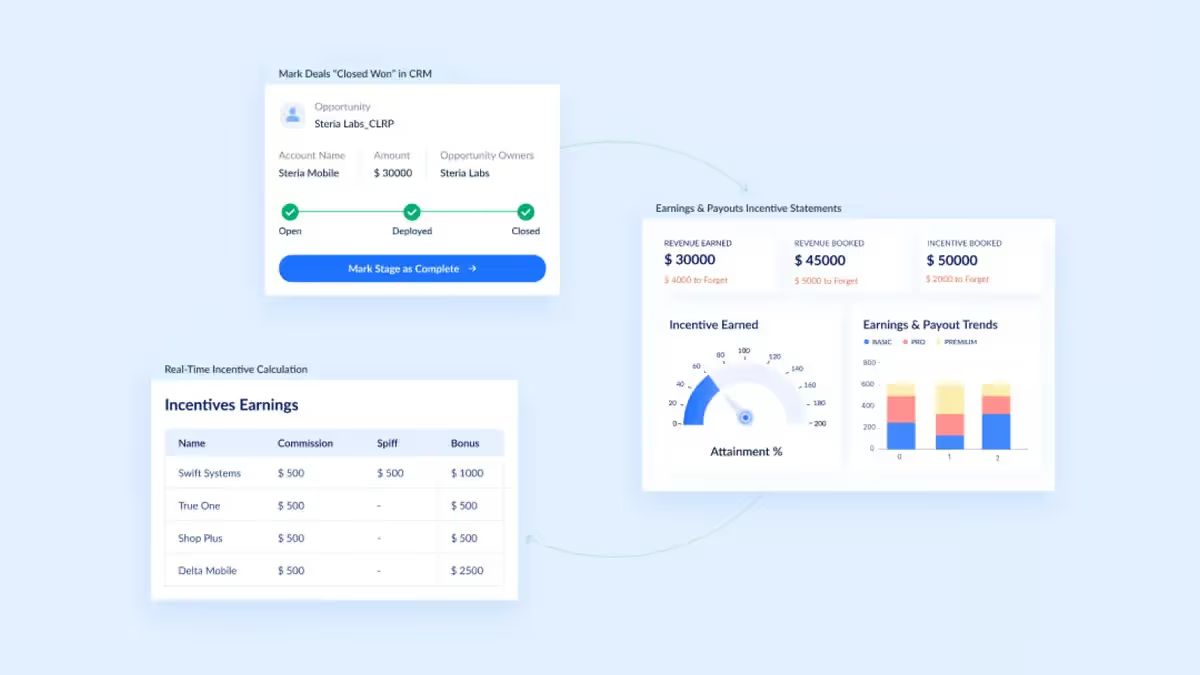
Visdum is a sales compensation software that focuses on ease of use and scalability. It has striong integrations with multiple CRMs, Billing, Accounting, ERP, etc. platforms which make it a comprehensive choice for data management across the stack.
- G2 Rating: 4.8/5 (579 reviews)
- Best For: Growing teams that need a CRM-connected commission engine with strong integrations and rep visibility, alonng with strong AI-powered insights.
Key Features of Visdum
- Automated Commission Calculations: In-built rate tables, visual rule builder, and scheduled data syncs to ensure your commissions are automatically computed whenever you want. Similar generation of commissions statements automatically which you can choose to mail to reps directly from Visdum.
- Real-Time Enterprise Dashboards and Analytics: Visdum has comprehensive dashboards for leadership, reps, managers, etc. to ensure everyone is up to date on the stats that matter to them. Commission estimator, forecasts, etc. are also in-built to empower more data-backed decision making.
- AI-Copilot: Visdum's AI Copilot is an AI assistant layered on top of your commission process. It is a conversational AI that allows users to query data, understand plan logic, and receive instant, natural language answers regarding calculations.
- Seamless Integrations: Integrate seamlessly with top CRMs (HubSpot, Salesforce, Zoho, etc.) and other billing, accounting, ERP, and other platforms. View full list of integrations here. Visdum's integration uses OAuth/SFTP, is SOC 2 Type II certified.
- Dedicated support: Although Visdum has a huge focus on ease of use, it also offers dedicated support to its customers and provides a comprehensive onboarding customized to the details of the customer.
- In-built multi-level approval workflows: Visdum supports multi-level approvals and ensures that all stakeholders haave a clear view of where their commissions are at the moment. Have a manager to Sales Head to Finance to Revops approval flow? Visdum can automate it seamlessly.
- Less Onboarding time: Unlike many compensation tools that require complex ETL and weeks of setup, Visdum offers pre-built, plug-and-play integration connectors that enable faster deployment with minimal technical effort.
Pros of Visdum
1. Seamless integration with existing systems for easy sales compensation management.
2. Intuitive design and easy navigation for efficient use.
3. Automation of manual processes, elimination of errors, and improved overall efficiency.
4. Quick and effective support for smooth onboarding and issue resolution.
5. Transparency in commission tracking leading to increased motivation and productivity.
6. Timely updates and clear details on sales translating into commissions.
7. Ability to handle diverse sales compensation plan scenarios with ease.
Cons of Visdum
1. Building out new plans may take some time, although support is quick in handling change requests.
2. Deal and payout data from CRM may take some time to reflect due to syncing frequency, but improvements are in progress.

2. Driven
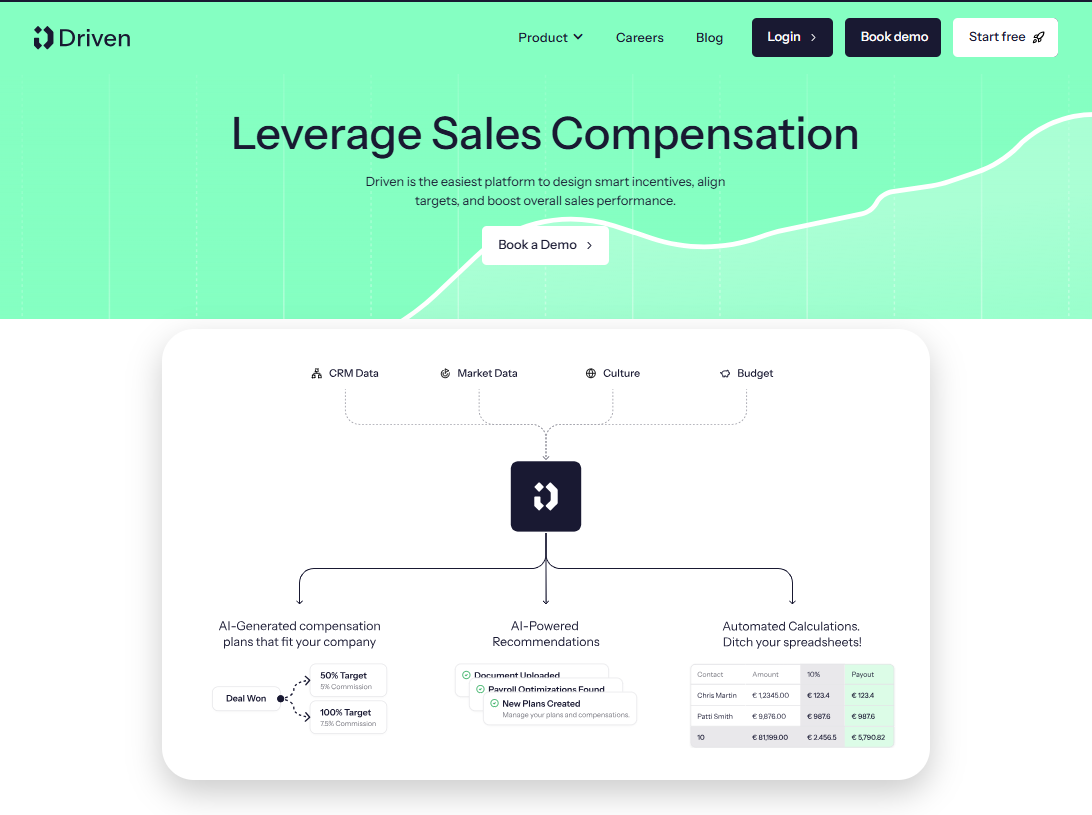
Driven is a sales compensation software built for teams that want commission clarity without spreadsheet chaos. It automates commission calculations, incentive plans, and payouts, while keeping reps, managers, and finance aligned with numbers everyone can trust.
- G2 Rating: Not available to confirm right now
- Best For: Teams that want clean, straightforward commission automation without spreadsheet chaos.
Key Features of Driven
- Automated commission calculations & payouts: Automatically calculates commissions and manages incentive plans and payouts to reduce manual work and errors.
- Rep-friendly commission visibility: Gives reps clear, up-to-date visibility into where they stand so they’re not guessing about earnings.
- Flexible plan management for managers: Lets managers tweak comp plans without breaking workflows, making iteration easier as plans evolve.
- Finance-ready reporting: Generates clean, accurate reports to reduce back-and-forth and speed up month-end processes.
- CRM integration & data sync: Connects with your CRM to keep deal data in sync and commissions up to date.
- Fast, straightforward UX: Designed to be quick to learn and practical for real-world sales compensation workflows (no cluttered dashboards).
Pros of Driven
1. Easy-to-understand commission tracking for reps and managers
2. Automated calculations that save time and reduce errors
3. Clean, intuitive interface that’s quick to learn
Cons of Driven
1. Advanced setups may need some onboarding support
2. Teams moving away from spreadsheets may need a short adjustment period
3. Some integrations may require manual configuration
3. Spiff
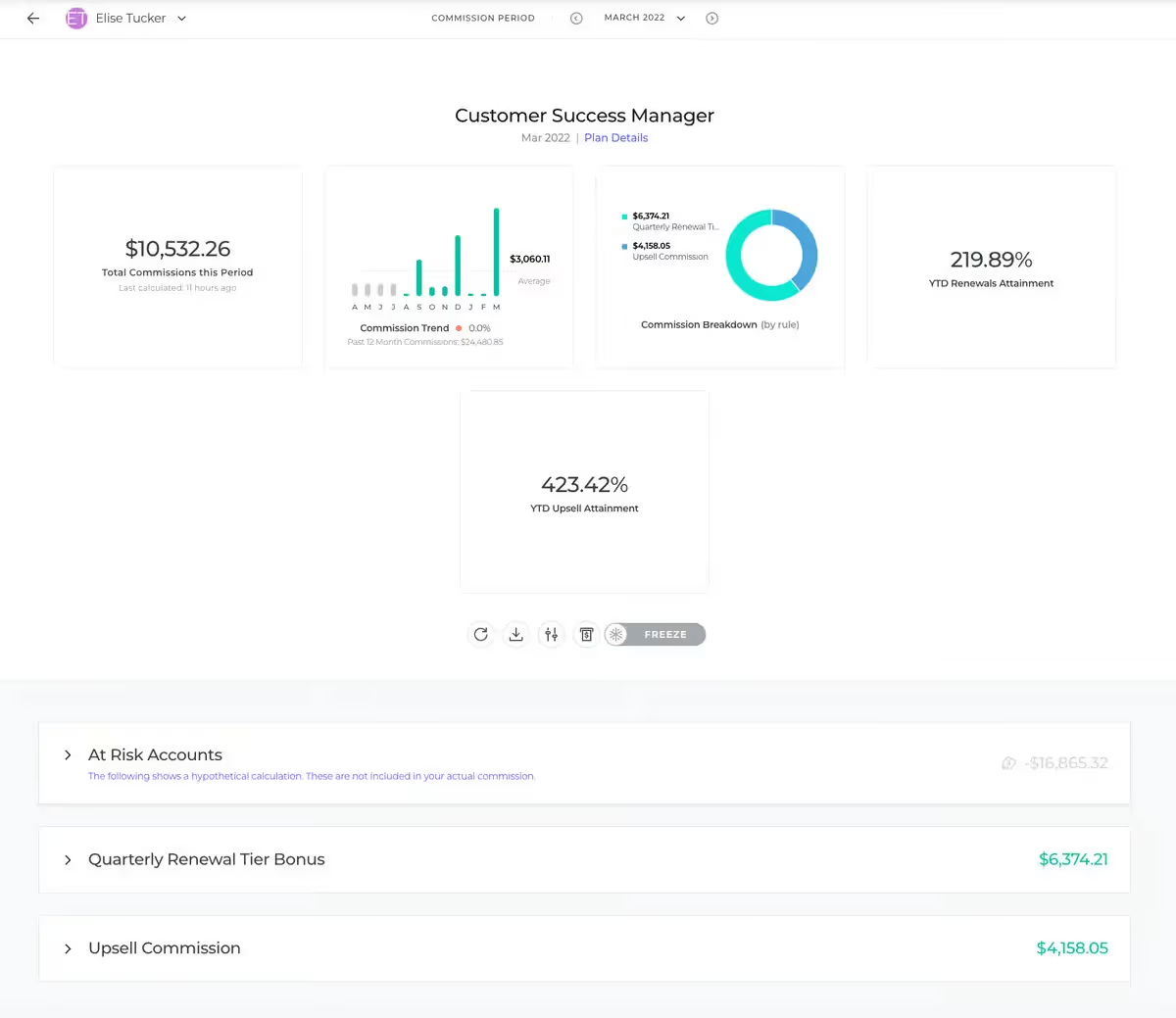
Spiff is a commission-tracking tool designed to give reps clear visibility into earnings and performance, with real-time tracking and a UI that’s easy to navigate. It’s also known for highly responsive customer support that helps teams handle complex compensation programs, though some users report UX and integration friction in certain areas.
- G2 Rating: 4.6/5 (3067 Reviews)
- Best For: Sales orgs that want real-time commission visibility for reps and strong support for complex plans.
Key Features of Spiff
- Real-time commission tracking: Lets reps monitor incentives, revenue, and percent-to-quota in real time for better planning.
- Rep-friendly interface: Simple navigation so payees can quickly understand their commission structure and earnings.
- Strong customer support: Known for hands-on help and personalized solutions for complex compensation programs.
- Analytics and reporting: Provides performance insights, with some users wishing for more advanced filtering and deeper analytics.
- Commission calculation explanations: Offers explanation screens to show how commissions were calculated (though some users find them confusing).
- Integrations/connectors: Connects with other systems to move data for commissions and reporting (but connector reliability has been a reported pain point).
Pros of SPIFF
1. Intuitive user interface with a friendly environment.
2. Provides great visibility for reps on commissions.
3. Allows concise and easy-to-use display of sales compensation information, with the ability to make changes retroactively.
Cons of SPIFF
1. Challenges in optimizing for individual requests, either time-consuming or expensive.
2. Slow and painful onboarding experience, causing significant delays in deployment.
3. Could benefit from more clarity in breakdowns, with abbreviations and short titles lacking explanations.
🔔 Must Read: Top Salesforce Spiff Alternatives
4. Qobra
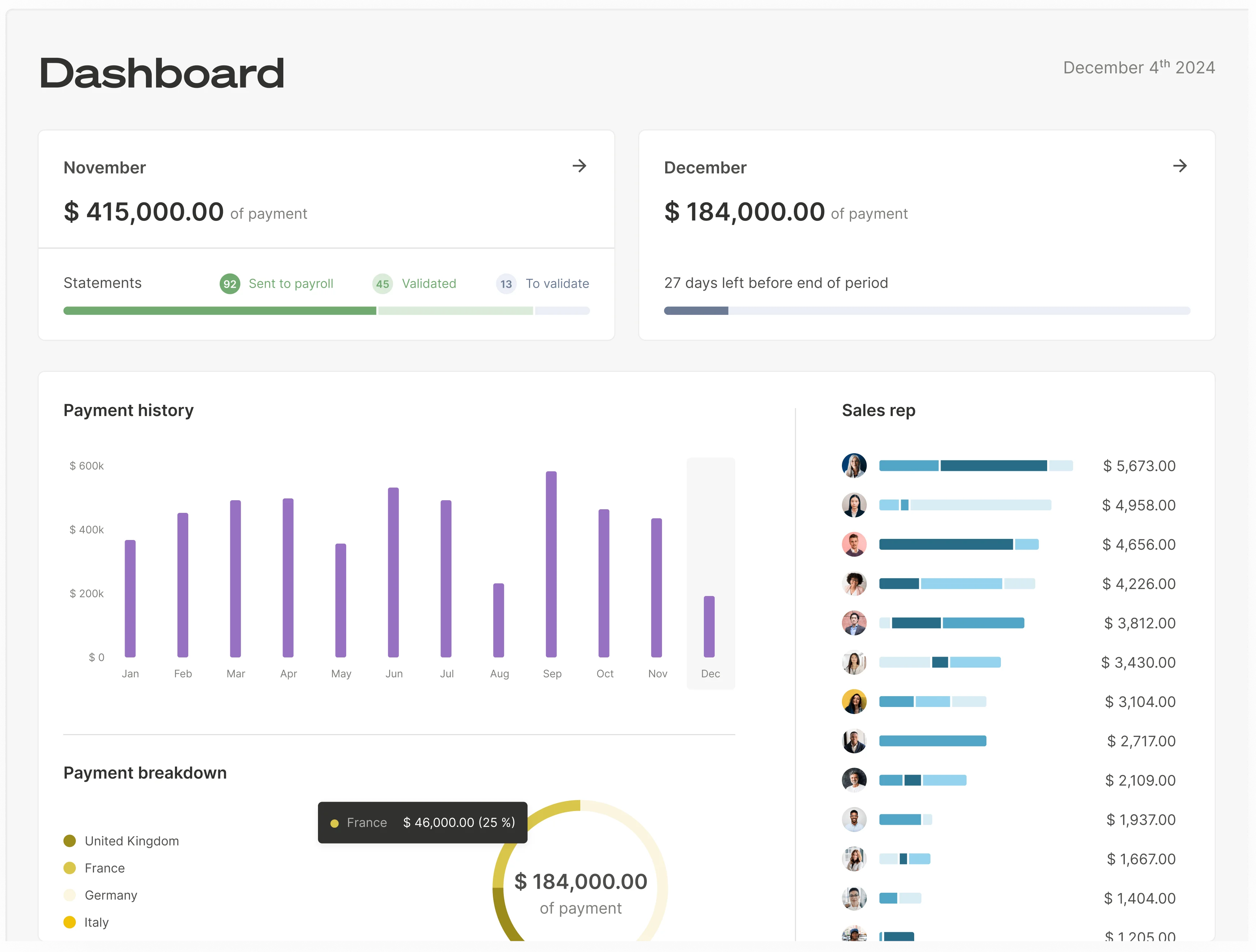
Qobra is a modern sales compensation management platform built to reduce commission errors, cut admin workload, and improve trust between finance and sales. It supports automated, compliant commission workflows and integrates with common CRM, payroll, and finance tools making it a strong fit for fast-growing teams that need reliability at scale.
- G2 Rating: 4.8/5 (1,067 reviews)
- Best For: Fast-growing teams that need scalable commission workflows, plan modeling, and strong reporting.
Key Features of Qobra
- Automated commission workflows: Automates complex commission calculations to reduce manual work and payout errors.
- CRM, payroll, and finance integrations: Connects with core revenue and finance systems to keep data flowing and payouts aligned.
- Real-time rep visibility: Lets sales reps track commissions in real time, improving transparency and trust.
- Plan modeling for managers: Enables managers to model and adjust compensation plans without needing advanced technical expertise.
- Reporting and analytics: Provides leadership with visibility into performance, commission costs, and incentive effectiveness.
- Scalability and reliability: Designed to support growing organizations as compensation structures and data volumes get more complex.
Pros of Qobra
1. Seamless CRM and payroll integrations to ensure accurate, automated payouts.
2. Real-time commission tracking for sales reps, enhancing trust and motivation.
3. Intuitive interface with powerful modeling and scenario planning capabilities.
4. Advanced reporting and analytics for finance and leadership visibility.
5. Scalable platform suitable for fast-growing organizations with complex needs.
Cons of Qobra
1. Advanced features may take time for new admins to master.
2. Qobra is not currently integrated with all peripheral software on the market (CRM, ERP, etc.).
5. CaptivateIQ

CaptivateIQ is a commission management software built to replace spreadsheets with automated calculations and flexible plan setup for complex compensation structures. Users often like its intuitive interface, strong customer support, and clear commission statements that make payouts easier to understand and trust.
- G2 Rating: 4.7/5 (3448 Reviews)
- Best For: Teams with complex compensation structures that want flexibility and clear commission statements.
Key Features of CaptivateIQ
- Automated commission calculations: Reduces manual spreadsheet work and helps minimize calculation errors.
- Flexible plan setup for complex comp: Supports complicated commission structures and ongoing plan management.
- CRM + accounting integrations: Connects with core systems to improve sales ops workflows and reduce manual data handling.
- Visual calculation clarity: Shows calculations in a clear, easy-to-follow way so reps and finance can understand how payouts were derived.
- Accurate, timely commission reporting: Produces commission reports and statements that improve transparency and confidence in pay.
- Customer support: Frequently praised for responsiveness and help during setup and ongoing usage.
Pros ofCaptivateIQ
1. Captivate IQ offers robust analytics for insightful sales performance data.
2. Seamless CRM integration ensures efficient data synchronization.
3. User-friendly interface enhances the overall user experience.
Cons of CaptivateIQ
1. CaptivateIQ may have a learning curve for some users, requiring initial training to fully leverage its features.
2. Customization options, while extensive, may be complex for users without a technical background, potentially impacting ease of use.
3. The initial setup process can be time-consuming, and users might experience delays before realizing the full benefits of the platform.
🔔 Must Read: Top CaptivateIQ Alternatives
6. Incentivate
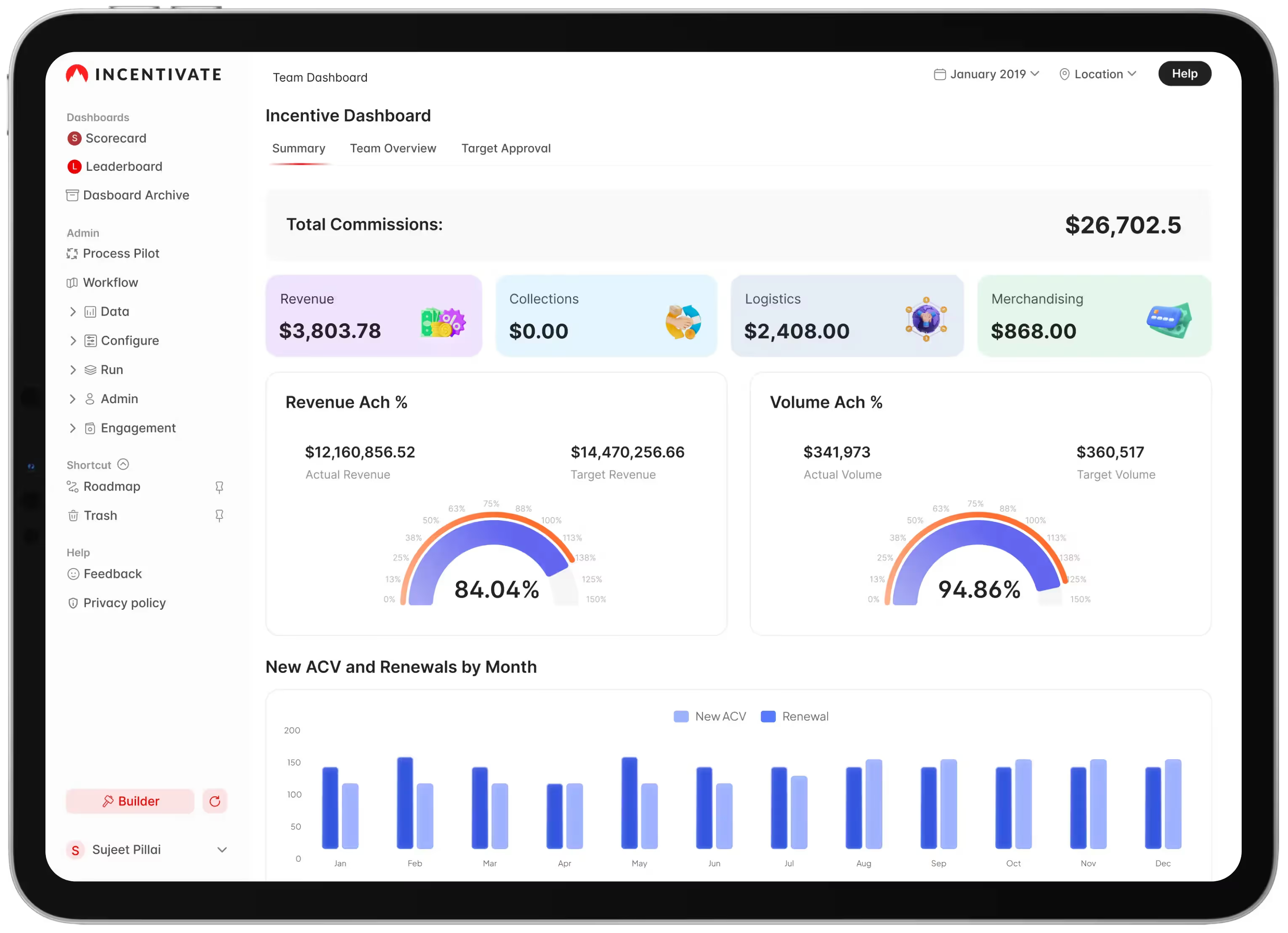
Incentivate is a commission management platform built for teams that need flexibility, forecasting, and deep analytics- especially when comp plans get complex across multiple roles and teams. It stands out for scenario modeling, customizable dashboards, and integration options, though some users report a learning curve and heavier admin effort during setup.
- G2 Rating: 4.7/5 (61 Reviews)
- Best For: Teams that need scenario modeling, forecasting, and advanced analytics for incentives.
Key Features of Incentivate
- Commission scenario modeling & forecasting: Model different commission scenarios and forecast potential earnings to help leaders design better incentive plans.
- Flexible commission structures: Supports complex hierarchies, split commissions, and multi-team structures.
- AI-powered analytics: Delivers actionable insights to optimize incentive strategies over time.
- Visualization tools: Makes performance and comp data easier to understand through visual reporting.
- Detailed reporting & customizable dashboards: Provides transparency across the org with configurable reporting views.
- Robust integrations: Offers integration options to keep data flowing across systems and reduce manual work.
Pros of Incentivate
1. Offers exceptional flexibility for handling complex team hierarchies and split commission arrangements.
2. Provides powerful AI-driven forecasting and modeling capabilities for strategic planning.
3. Delivers comprehensive performance analytics with customizable visualization options.
Cons of Incentivate
1. Steeper learning curve compared to simpler commission management solutions.
2. Administrative overhead can be significant for organizations without dedicated resources.
3. Occasional performance issues when processing unusually large historical data sets.
🔔 Must Read: Top 15 SaaS tools every CFO needs to stay ahead of the game
7. Commissionly

Commissionly is a commission management platform built to reduce payout errors, improve transparency, and give reps easy access to earnings, especially for teams that want automation plus mobile-friendly visibility. It’s well-suited for handling tiered/complex structures, though some teams note setup time, limited dashboard customization, and occasional CRM sync delays.
- G2 Rating: Not available to confirm right now
- Best For: Teams that want automated commissions with mobile access and transparent tracking.
Key Features of Commissionly
- Automated commission calculations: Automates calculations to reduce errors, disputes, and manual admin work.
- Mobile access for reps: Lets reps check earnings and performance metrics on the go.
- Transparent commission tracking: Provides clear tracking that reduces repetitive “where’s my commission?” questions.
- Support for complex plans: Handles complex commission structures and tiered payment systems.
- Commission statements & reporting: Generates commission statements and reports to improve communication between sales and management.
- CRM sync (with noted delays): Integrates with external CRMs to pull data, though some users report occasional synchronization lag.
Pros of Commissionly
1. Provides a transparent, automated commission tracking system that virtually eliminates calculation errors.
2. Offers convenient mobile access to earnings data, supporting motivation and performance insights anywhere.
3. Handles complex commission structures and tiered payment systems effectively.
Cons of Commissionly
1. Initial setup process can be time-consuming and resource-intensive.
2. Limited dashboard customization options for different user roles and permission levels.
3. Occasional synchronization delays when integrating with certain external CRM systems.
8. QCommission
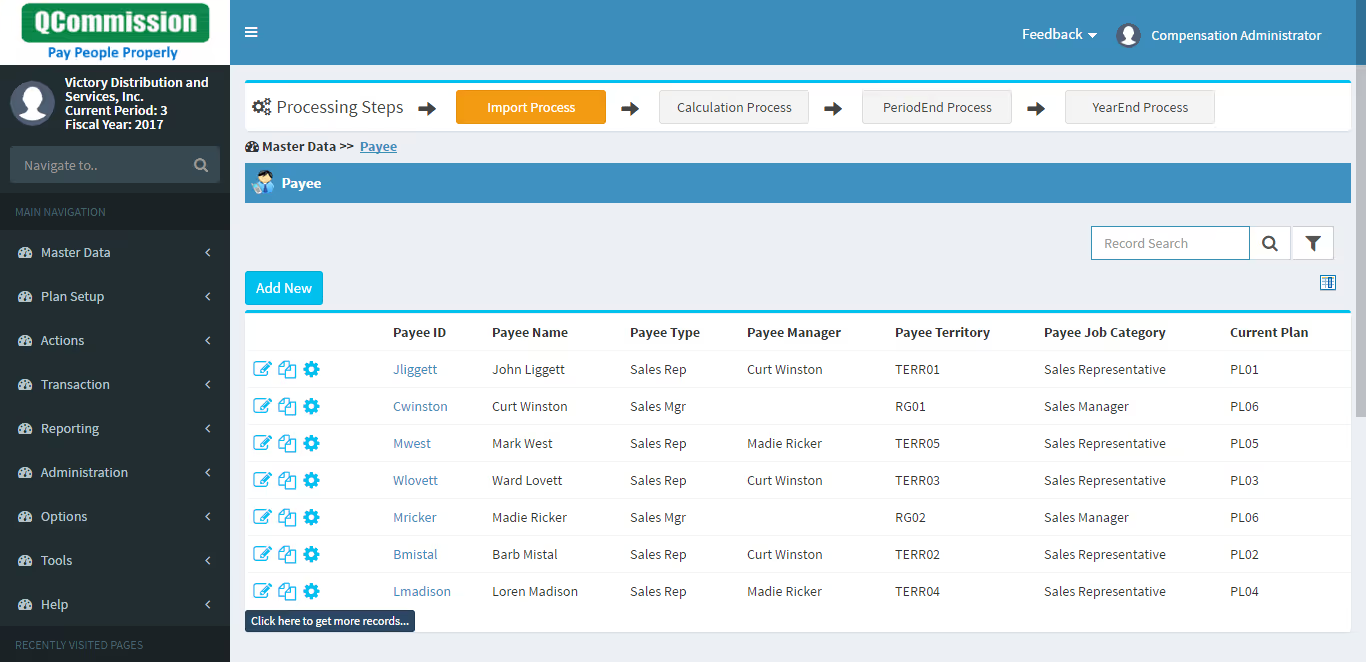
Q Commission is a commission management solution built for organizations that need maximum flexibility and control, especially when commission plans are highly complex or varied across teams. It’s known for handling large transaction volumes, integrating with major accounting/ERP systems, and maintaining strong auditability for compliance.
- G2 Rating: Not available to confirm right now
- Best For: Orgs with highly complex or custom commission plans needing accounting and ERP integrations.
Key Features of QCommission
- Flexible commission plan support: Handles virtually any commission plan structure, including unique models and multiple plan types.
- Robust calculation engine: Processes large volumes of transactions quickly to shorten the time from sale to commission payment.
- Accounting + ERP integrations: Direct integrations with major accounting and ERP systems to streamline payment processing.
- Strong audit trails: Maintains a complete history of transactions and calculations to support compliance and internal reviews.
- What-if modeling: Helps teams test and validate new commission structures before rolling them out.
- Report customization: Offers configurable reporting (though it can require a learning curve for advanced customization).
Pros of Q Commission
1. Provides exceptional flexibility to accommodate virtually any commission plan structure or calculation method.
2. Offers strong integration with major accounting and ERP systems for streamlined payment processing.
3. Delivers comprehensive auditing capabilities with complete transaction history for compliance purposes.
Cons of Q Commission
1. User interface feels somewhat dated compared to more modern commission management solutions.
2. Report customization has a steep learning curve requiring technical expertise.
3. Implementation and ongoing adjustments often require vendor professional services involvement.
9. Varicent
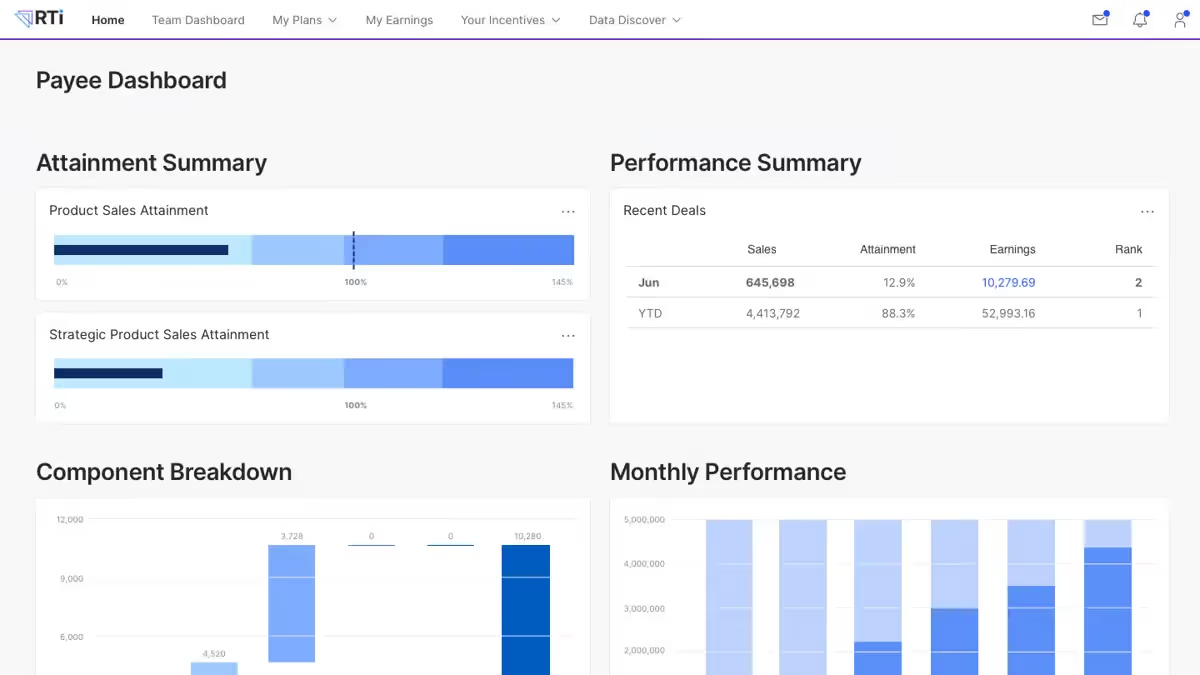
Varicent is a sales performance management (SPM) and sales compensation platform built for teams that need robust target setting, performance tracking, and scalable compensation management. It’s valued for its flexible calculations, integrations, and an interface that supports analysis though implementation and ongoing administration can be complex for smaller or non-technical teams.
- G2 Rating: 4.5/5 (589 Reviews)
- Best For: Enterprise teams that need robust sales performance management plus scalable compensation modeling.
Key Features of Varicent
- Sales performance management (SPM): Helps set realistic targets and track progress over time to improve performance management.
- Compensation plan flexibility: Supports customized employee compensation plans tailored to business needs.
- Intuitive interface for analysis: Designed to make navigation and data analysis easier for users.
- Integrations and data handling: Offers integration capabilities to bring data in and support performance/comp workflows.
- Scalable for larger orgs: Built to scale with growing teams and complex performance/comp structures.
- Extensible calculation use cases: Flexible enough to support other business processes and calculations beyond core compensation.
Pros of Varicent
1. Varicent offers flexible compensation and reporting calculations.
2. User-friendly web interface for sales reps and leaders.
3. Provides diverse options for importing and exporting data effectively.
Cons of Varicent
1. Document management module, though redesigned, posed challenges in the past.
2. Additional features for plan modeling and forecasting are desired.
3. Unnotified updates may negatively impact the system's performance.
10. Xactly Incent
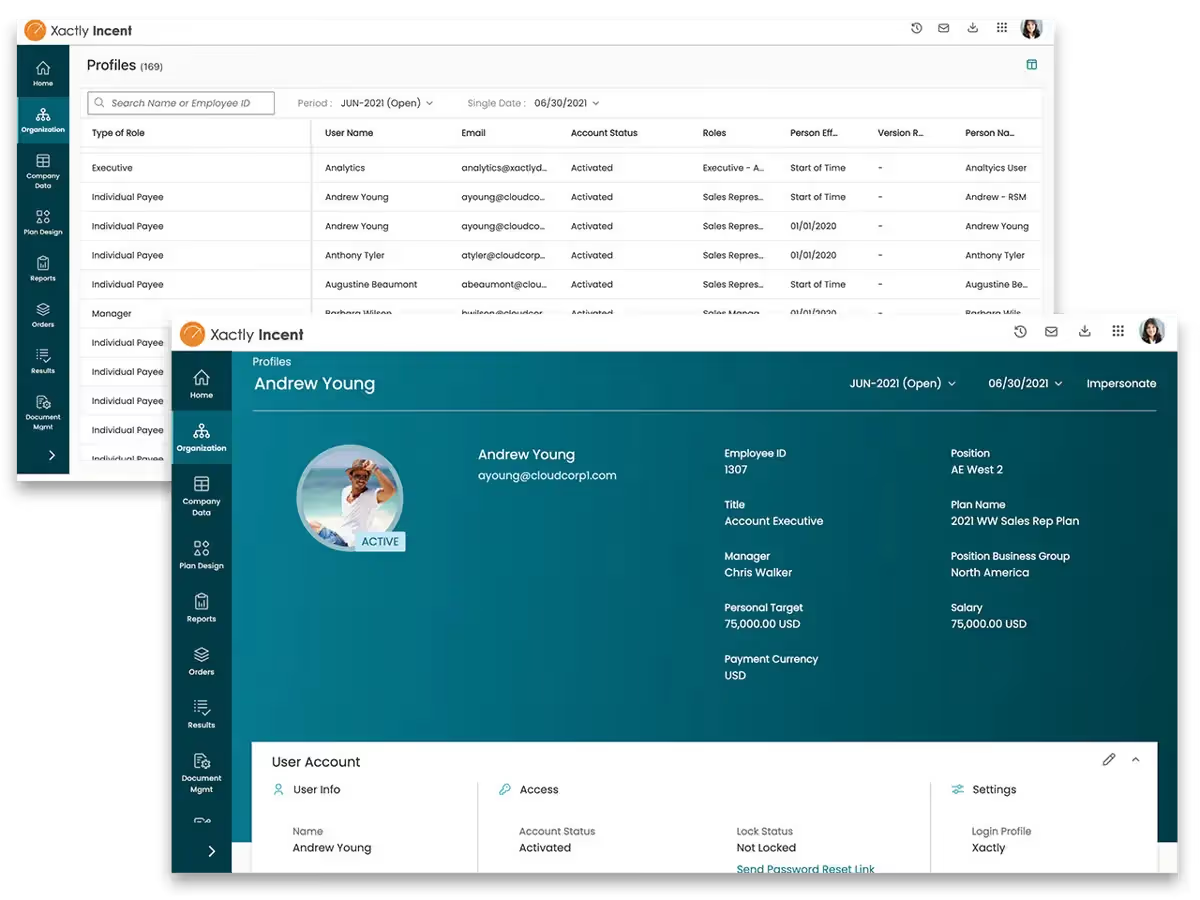
Xactly Incent is a sales compensation tool used to track incentives and manage commission processes across teams. Users often call out its user-friendly experience, customizable reporting, real-time incentive visibility, and strong audit-friendly features like impersonation and document management.
- G2 Rating: 4.3/5 (865 Reviews)
- Best For: Enterprises that need reliable commission processing with customizable reporting and audit-friendly documentation.
Key Features of Xactly Incent
- Intuitive UI for admins and payees: Designed to be easy to use for both compensation admins and reps.
- Real-time incentive visibility: Gives payees up-to-date visibility into commissions and incentives.
- Customizable reporting: Offers highly configurable reports for different stakeholders and requirements.
- Document management + audit trail: Supports document management and signed documentation tracking for audit readiness.
- Impersonation capability: Allows admins to impersonate users for troubleshooting and support workflows.
- Efficient, accurate processing: Handles complex commission plans as well as simpler ones without slowing down core processing.
Pros of Xactly
1. Xactly excels in credit and commissions calculation, along with robust rule management.
2. Effective hierarchy management ensures accurate tracking of organizational structures.
3. Indirect credit through named relationships adds flexibility to the credit allocation process.
Cons of Xactly
1. Limited interface customization, with default download format as XLSX instead of CSV.
2. Analytics reports exclude terminated employees, impacting data comprehensiveness.
3. Automation tools for sequential tasks are desired for enhanced efficiency.
Suggested Reading: Top Xactly Incent Alternatives in 2026

How to Build a Complete Sales Compensation Stack (Not Just Pick a Tool)
Choosing a software tool is a great first step. But if your commission payouts rely on disconnected spreadsheets, if sales managers get caught in disputes, or if your finance team is rechecking numbers at month-end- then even the best product won’t fix the root issue.
To truly streamline incentive compensation management, you need more than just a vendor.
You need a system: a connected compensation stack where every tool plays a role in making accurate calculations, reducing errors, and aligning with your sales strategy.
The 7 Layers of a Modern Sales Compensation Stack
Each layer solves a different part of the workflow from capturing deal data to pushing finalized payouts to payroll. When stitched together, these tools form a single source of truth that improves visibility and trust across your organization.
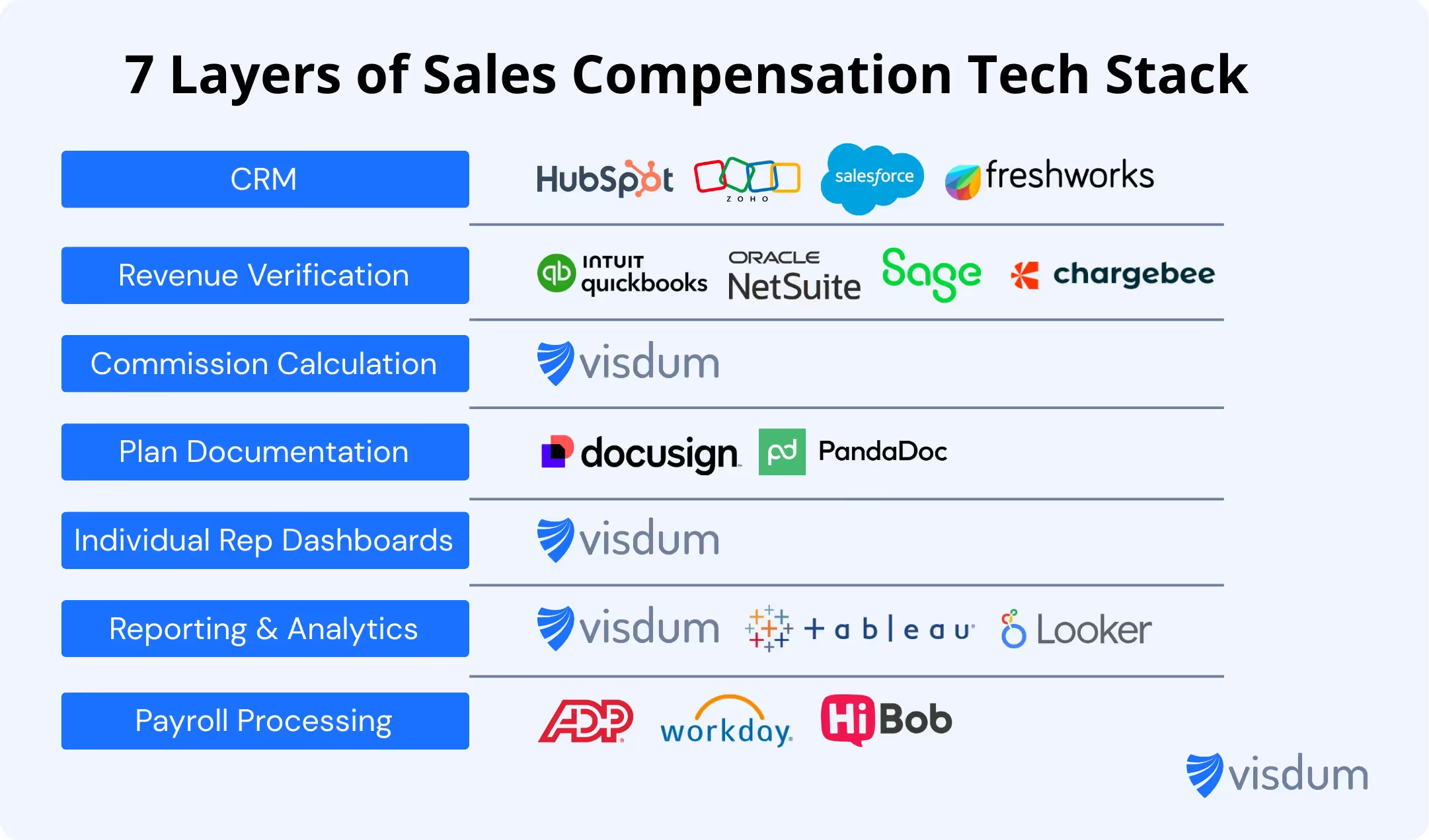
✅ Best Practice: Start small. For many mid-market SaaS teams, even 3–4 integrated tools can drastically improve efficiency and reduce payout disputes.
Don’t Just Pick Tools: Use a Decision Matrix
With so many options out there, it's tempting to follow vendor hype or peer buzz. But choosing a sales compensation tool based on gut feel can backfire when real-world needs surface like integration complexity, commission calculation errors, or adoption struggles from your sales managers.
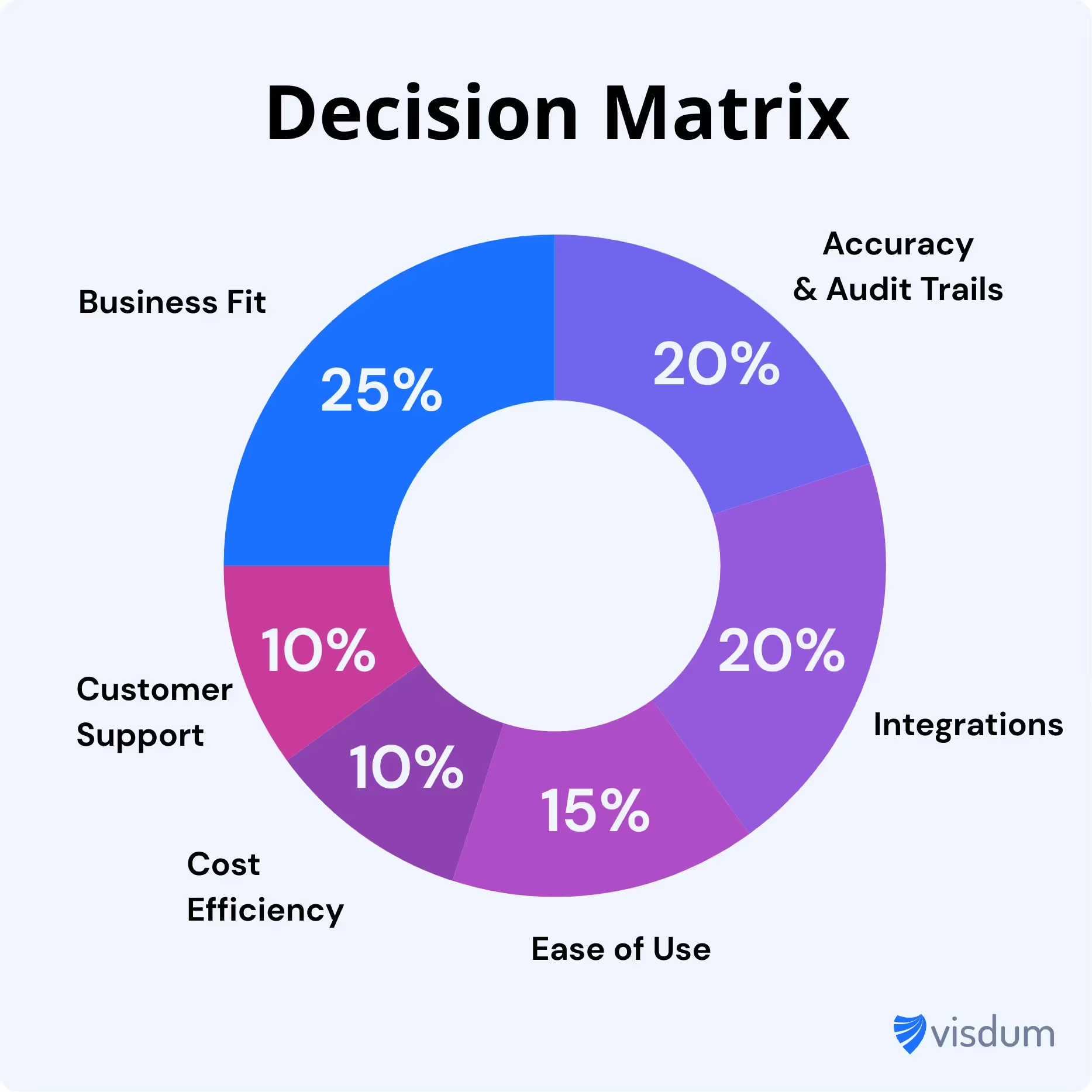
This matrix helps you objectively compare tools across factors that actually impact long-term success- business fit, integration strength, accuracy & audit trails, ease of use, and even support for sensitive data.
Now that you know what to weigh, here’s how to ask the right questions.
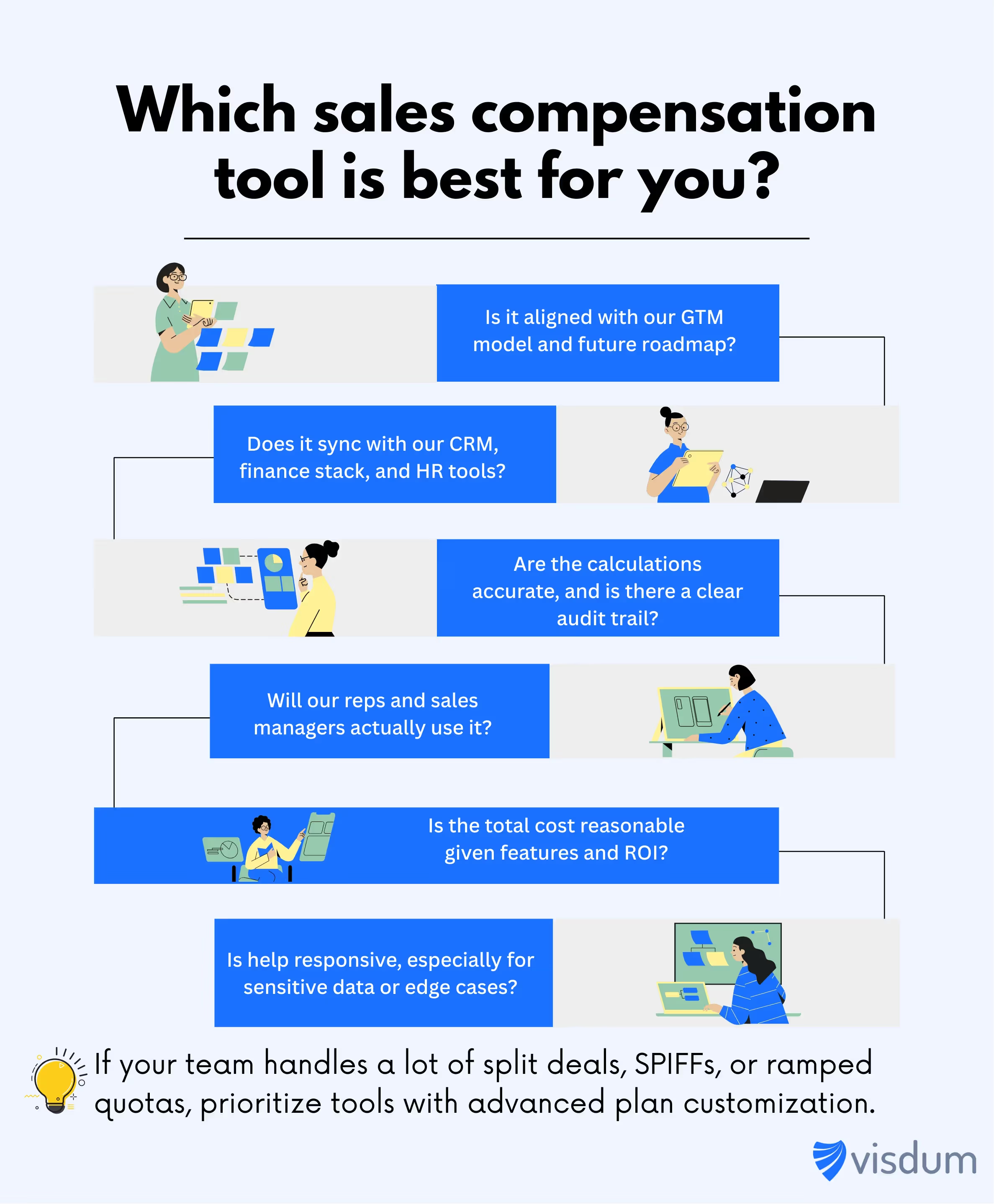
Each question helps validate if the tool aligns with your sales strategy, supports your tech stack, and empowers reps and finance teams alike. If your organization handles complex commission plans or split deals, prioritize tools that offer robust modeling and advanced access control.
Real-World Stack Example
Let’s say you’re a 25-person SaaS company scaling fast. Your biggest issues? Inconsistent commission payouts, reps unclear on targets, and leadership struggling to forecast costs.
Here’s what your ideal stack might look like:
- CRM: Salesforce
- Revenue Sync: QuickBooks
- Comp Engine: Visdum (automates logic, syncs with both CRM and finance)
- Plan Documentation: DocuSign
- Rep Access: Visdum dashboards + automated Slack updates
- Reporting: Visdum Leadership Dashboards
- Payroll: ADP or Workday
In this setup, your sales commission plan is clear, automated, and auditable. Reps stay focused on selling. Finance gets real-time visibility. And leadership gets peace of mind.
Suggested Readings
Top Everstage Alternatives in 2026
Top Quotapath Alternatives in 2026
Final Thought: Stack > Software
A tool alone won’t transform how your team earns and gets paid.
But when you build a thoughtful stack with connected layers that support both sales managers and finance teams, you create a system that drives revenue, reduces errors, and scales with your business.
This is what modern sales compensation management looks like.
In conclusion, each of the top 10 sales commission software companies we've discussed has unique features that cater to the different needs and preferences of users. Whether it's the ease of use, customization, robust reporting, or integration capabilities, there's a software solution for every sales team out there.
We recommend that you carefully evaluate your business needs budget, and choose the software that aligns with your goals and objectives. With the right sales commission software, you can automate and streamline your commission processes, motivate your sales team, and drive revenue growth for your business.
Interested in learning how Visdum can help?

FAQs
What is Sales Compensation Software?
Sales Compensation Software is a specialized tool designed to automate and streamline the management of sales commissions and incentives within an organization. It helps businesses efficiently calculate, track, and manage the compensation owed to their sales teams based on various performance metrics, such as sales targets, revenue generation, or specific key performance indicators (KPIs).
This software ensures accuracy, transparency, and fairness in compensating sales professionals while saving time and reducing the risk of errors associated with manual commission calculations.
Which Compensation Plan is Best Suited for New Salespersons?
The best compensation plan for new salespersons often depends on the nature of the business, industry, and the specific goals of the sales team. However, a common and effective compensation plan for new salespersons is the "Base Salary plus Commission" model. This plan provides a stable income through a fixed base salary and offers additional earnings through commissions tied to sales performance.
In this model, new salespersons receive a guaranteed base salary, providing financial stability and motivation. Commissions are then earned based on the sales they generate, encouraging a results-driven approach. This hybrid approach balances the security of a fixed income with the opportunity for increased earnings based on individual sales achievements, making it attractive for new sales team members as they establish themselves in their roles.
How do I determine which sales compensation software is best for my business?
To identify the best sales compensation software, assess your business needs, consider budget constraints, and prioritize features that align with your organizational goals. It's crucial to find a solution that not only meets your current requirements but also supports future growth.
What factors should I consider when choosing a sales compensation software?
When selecting sales compensation software, factors such as ease of use, customization options, integration capabilities, responsive customer support, and scalability play a vital role. Prioritize platforms that offer a seamless fit with your existing processes and provide the flexibility to adapt to your evolving business needs.
How long does it take to implement sales compensation software?
Implementation can take anywhere from a few days to several weeks depending on plan complexity, number of data sources, and how clean your CRM data is.
What integrations should sales compensation software support?
At minimum, look for CRM integration plus payroll or accounting support. If you run usage based billing or complex revenue workflows, prioritize billing and ERP integrations too.
Can sales compensation software handle splits, accelerators, and clawbacks?
Most modern tools can handle these, but the difference is how easily you can configure them and how clearly the platform explains the final calculation to reps.
What should I track to reduce commission disputes?
Track a clean audit trail of source data, credits, adjustments, approvals, and payout status. Also ensure reps can see deal level commission breakdowns and the exact logic behind each payout.
.avif)